Sunday, December 4, 2011

MIND MAP


Sometimes in our studying we face very long chapter . We really want something to help us to memorize and link the whole information to gather. One of the most beneficial ways to do that is to draw MIND MAP. MIND MAP will help you a lot . But Before that, I really recommend you to understand the subject well and when you're drawing the MIND MAP try to focus in every single word you read and write. Here in these post I have quoted these steps from www.mindtools.com  and I recommend you to visite it because it is really a good web site.I used this way in infs2412 course and othe courses and it help me a lot.


About Mind Maps

Mind Maps were popularized by author and consultant, Tony Buzan. They use a two-dimensional structure, instead of the list format conventionally used to take notes.
Mind Maps are more compact than conventional notes, often taking up one side of paper. This helps you to make associations easily, and generate new ideas. If you find out more information after you have drawn a Mind Map, then you can easily integrate it with little disruption.
More than this, Mind Mapping helps you break large projects or topics down into manageable chunks, so that you can plan effectively without getting overwhelmed and without forgetting something important.
A good Mind Map shows the "shape" of the subject, the relative importance of individual points, and the way in which facts relate to one another. This means that they're very quick to review, as you can often refresh information in your mind just by glancing at one. In this way, they can be effective mnemonics - remembering the shape and structure of a Mind Map can give you the cues you need to remember the information within it. As such, they engage much more of your brain in the process of assimilating and connecting information than conventional notes do.
When created using colors and images or drawings, a Mind Map can even resemble a work of art!

Uses

Mind Maps are useful for:
  • Brainstorming - individually, and as a group.
  • Summarizing information, and note taking.
  • Consolidating information from different research sources.
  • Thinking through complex problems.
  • Presenting information in a format that shows the overall structure of your subject.
  • Studying and memorizing information.


Drawing Basic Mind Maps

To draw a Mind Map, follow these steps:
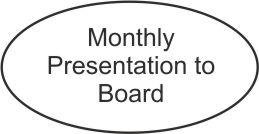
1. Write the title of the subject you're exploring in the center of the page, and draw a circle around it. This is shown by the circle marked in figure 1, below.
(Our simple example shows someone brainstorming actions needed to deliver a successful presentation.)
Figure 1
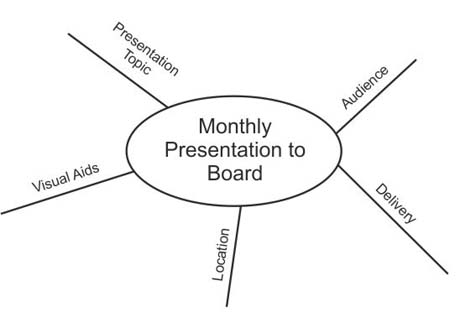
2. As you come across major subdivisions or subheadings of the topic (or important facts that relate to the subject) draw lines out from this circle. Label these lines with these subdivisions or subheadings. (See figure 2, below.)
Figure 2
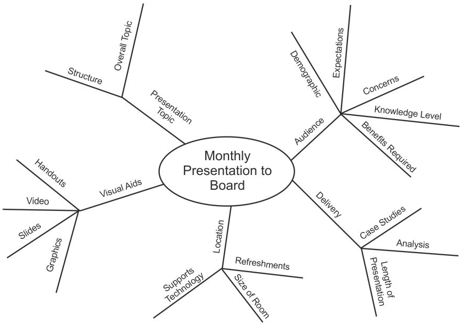
3. As you "burrow" into the subject and uncover another level of information (further subheadings, or individual facts) belonging to the subheadings above, draw these as lines linked to the subheading lines. These are shown in figure 3.
Figure 3
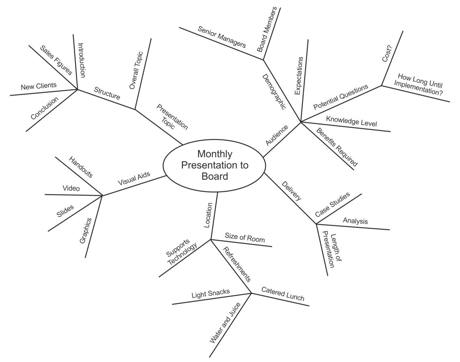
4. Then, for individual facts or ideas, draw lines out from the appropriate heading line and label them. These are shown in Figure 4.
Figure 4
5. As you come across new information, link it in to the Mind Map appropriately.
A complete Mind Map may have main topic lines radiating in all directions from the center. Sub-topics and facts will branch off these, like branches and twigs from the trunk of a tree. You don't need to worry about the structure you produce, as this will evolve of its own accord.
Tip:
While drawing Mind Maps by hand is appropriate in many cases, software tools like MindGeniusiMindMap, and Mindjet can improve the process by helping you to produce high quality Mind Maps, which you can then easily edit or redraft. (Click here for a full list of Mind Map software.)

Using Mind Maps Effectively

Once you understand how to take notes in Mind Map format, you can develop your own conventions for taking them further. The following suggestions can help you draw impactful Mind Maps:

Use Single Words or Simple Phrases

Many words in normal writing are padding, as they ensure that facts are conveyed in the correct context, and in a format that is pleasant to read.
In Mind Maps, single strong words and short, meaningful phrases can convey the same meaning more potently. Excess words just clutter the Mind Map.

Print Words

Joined up or indistinct writing is more difficult to read.

Use Color to Separate Different Ideas

This will help you to separate ideas where necessary. It also helps you to visualize the Mind Map for recall. Color can help to show the organization of the subject.

Use Symbols and Images

Pictures can help you to remember information more effectively than words, so, where a symbol or picture means something to you, use it. (You can use photo libraries like iStockPhoto to source images inexpensively.)

Using Cross-Linkages

Information in one part of a Mind Map may relate to another part. Here you can draw lines to show the cross-linkages. This helps you to see how one part of the subject affects another.

Key Points

Mind Mapping is an extremely effective method of taking notes. Not only do Mind Maps show facts, they also show the overall structure of a subject and the relative importance of individual parts of it. They help you to associate ideas, think creatively, and make connections that you might not otherwise make.
Mind Maps are useful for summarizing information, for consolidating large chunks of information, for making connections, and for creative problem solving.
To use Mind Maps effectively, make sure you print your words, use different colors to add visual impact, and incorporate symbols and images to further spur creative thinking.
If you do any form of research or note taking, try experimenting with Mind Maps. You'll love using them!


E-Commerce and E-Business..~


Overview of E-Business and E-Commerce


there are clear difference between e-commerce and e-business.E-Commerce is like the normal market where you can buy or sell and do many things electronic . Whereas, e-business is broader than that an ,where you have electronic market and also you can get or receive services.


.....
PuRe VerSus PaRtIaL EC


*Pure physical ( Brick and mortar organisation)
*Partial EC (Click and mortar organizations)
*Pure digital (virtual organisation)
.....


TyPeS oF E-Commerce :


1- Business to consumer (B2C): the relationship between company (seller) and individual ( buyer).
2- Business to business (B2B): the relationship between companies both (seller and buyer ).
3-Consumer to consumer (C2C): the relationship between consumers both ( seller and buyer ).
4- Business to employee ( B2E): the relationship between an organisation and its employee and the special services that it provided for them.
5-E-Government : when the Gov. use the internet to provide services to its citizen.
6-Mobile consumer ( m-consumer): the  using of  e-commerce by the cellphone by using wireless environment.


MaJoR E-Commerce Mechanisms:


1- Forward auction: in which one sellers  offers item(s) for bidding and several buyers compete to offer the price the seller will accept. 
2-Reverse auction:Type of auction in which several sellers offer their items  for bidding, and compete for the price which a  buyer will accept.
3-Electronic storefront: is a web site on the internet representing a single store.
4-Electronic mall ( cybermall or e-mall ): is a collection of individual shops under one internet address (B2C).

5- Electronic marketplace:is a central , virtual market space on the web where many  buyers and many  sellers can conduct electronic commerce and electronic business activity.
.........


BeNeFiTs AnD lImItAtIoN Of E-Commerce :


 *Benefits:
       1-organization:         
                -more accessible 
                -lowering the cost of processing 
                -distributing and retrieving 


      2-Customer:
            -  vast number of product & services 
         
      3-society:
               - The ability to easily and conveniently deliver information, services and product to people in cities ,rural areas and developing countries.


Monday, November 7, 2011

Network Computing


This time I'll post what I have wrote in my own notes in the lecture


social capital : is like wasta , you can do so many thing by it and you'r life will be easier.


Network: connection between people.


computing devices: process, storage, connect
...
Network Types:


         LAN:
               -line File Server: it is the biggest and the most important
                                     :it helps us for :connecting , share resources
              -Nodes:They are small computers
              -Wired and Wireless Communication
             -Expansion card :is a card that can be connected to the mother board, so you have the ability to          special apps or services.
             -Software: which control all network activity
...
...
Topology:
       -Bus
      -Star
      -Ring
.
network topology


press Topology for more information


..........


Gateway: connect dissimilar networks
Bridge:connect similar networks
Router: routs messages through several connected LANs or to a wide area network


-
WAN: contain from many local area networks (LANs)
VAN:use something else infrastructure by leasing for your use
-
Backbone network: is the most important part which connect all parts


-
Internet: international network , and it is  owned by no one  in the whole world.
Intranet: inside one national and no one can access unless you belong to that company or organisation
Exrtenet: is a connection of intranet
-
Virtual Private Network: is a network that uses primarily public telecommunication infrastructure, such as the Internet, to provide remote offices or traveling users access to a central organizational network.


-----------------------
Darknets: a network that is a accessible by specific people
                -not for public
                -for specific people
               -high security


Operating of the Internet:
IP: the set of rules used to send and receive packets from one machine to another over the Internet .
TCP: Transmission Control Protocol
...


World Wide Web: is a part of the Internet
-we can enter the Internet by different browser


- Home page: is the first page in the site


-every Domain is URL but not every URL is domain


-Webmaster: is the responsible to look after a web site


Sunday, October 23, 2011

chp ,4 review


Managing Data :

   ▀ The Difficulties of Managing Data:


      1- The amount of data increases daily.
      2-The data are distributed in many places
      3-The data are coming from various sources.
      4- The Data come the organization site.
     
The Data Life Cycle

Collect data --> Store data --> Analyse data +  Tool analyse --> Result --> Solution

The Data Hierarchy 


                                          ▬▬▬▬▬▬▬▬ File▬▬▬▬▬▬▬
                                         ▐                                                            ▐
                    ▬▬▬▬ Record▬▬▬▬    ▬▬▬▬Record ▬▬▬▬
                   ▐                                        ▐                                                  ▐ 
        ▬▬ Field ▬▬                             Field         Field                         Field▬▬
      ▐                        ▐                                                                                                       ▐                            
Byte              ▬▬ Byte▬▬                                                                                            Byte           ▬▬ Byte▬▬
                     ▐                      ▐                                                                                                            ▐                      ▐ 
                       Bit              Bit                                                                                                                  Bit               Bit


The Database Approach 

database management system
      Min:                                                  &                      Max:
             ● Data redundant                                                ●Data Security
              ●Data isolation                                                   ● Data Independence
              ● Data Inconsistency                                          ●Data Integrity

▀ Designing The Data
:
 Data model: is diagram that represent entities in the database and their relationship
 Entity :Table
Attribute: field
Instance:record
primary key vs   secondary key


Friday, October 14, 2011

Review chp.3


......
▀ Privacy: is the right to be alone and to be free of unreasonable personal intrusions.
          ► Electronic Surveillance
          ►Personal Information in Database
          ► Internet Bulletin Boards and Newsgroup
          ►Privacy Codes and Policies
           ►International Aspects of Privacy .

▀Accuracy
 ▀Property
▀Accessibility 


▓▓▓▓▓▓▓▓


▀Threat to Information system:
        ●Threat
        ● Exposure
        ● Vulnerability
        ●Risk

   ▬▬▬▬

●Unintentional
●Intentional:
         ▪▪ Espionage or trespass
         ▪▪ Information extortion
         ▪▪ Sabotage or vandalism
         ▪▪Theft 
         ▪▪Identity theft
         ▪▪Software attack:
                     ▫Viruses         ▫Trojan horses          ▫Back doors
                    ▫Phishing         ▫Worms                    ▫Logic bombs
                            ▫Denial of service       ▫Pharming
                    ▫Alien software:
                              -pestware        -adware      -spyware
                              -spamware      -spam          -cookies    - webbugs 
      
                              
        ▪▪Compromises to intellectual property


                                                             ▓▓▓▓▓▓▓▓


▀Protecting Information Resource 
      
        ●Risk Analysis 
                    
                        ▪▪Risk management
                         ▪▪Risk analysis 
                         ▪▪Risk mitigation
                                    ▪ implementing controls to prevent identified threat from occurring 
                                     ▪developing a means of recovery should the threat become reality 
                          ▪▪Risk acceptance
                          ▪▪Risk limitation
                           ▪▪Risk transference
                           ▪▪ Controls evalutation  

         ●Controls
                    
                   ▪▪General control:
                               ▪general control
                               ▪physical control
                               ▪access control 
                                          -the User Is
                                          -the User Has
                                          -the User Does
                                          -the User Knows 
                                                    ..passwords
                                                   ..passphrase


       ●Information System Auditing 
           
                    ▪▪Type of the Auditor and Audit
                    ▪▪How Is Auditing Executed ?

   ●Disaster Recovery Planning

                     ▪▪Disaster recovery 
                       ▪▪Disaster avoidance

                    
                                                         ▓▓▓▓▓▓▓▓


Sunday, October 9, 2011

كن أنت كمـا انت !


●●●●●●►◄●●●●●●

كن مميز كن أنت
ثق بـاختلافك فأنت مميز
لا تجري نحو وما يفعله الآخرين فتكون مثل االامعة
-.روي من حديث حذيفة بن اليمان رضي الله عنه أن النبي صلى الله عليه وسلم قال : (لا تَكُونُوا إِمَّعَةً ، تَقُولُونَ : إِنْ أَحْسَنَ النَّاسُ أَحْسَنَّا ، وَإِنْ ظَلَمُوا ظَلَمْنَا ، وَلَكِنْ وَطِّنُوا أَنْفُسَكُمْ ، إِنْ أَحْسَنَ النَّاسُ أَنْ تُحْسِنُوا ، وَإِنْ أَسَاءُوا فَلَا تَظْلِمُوا) رواه الترمذي (2007) بإسناد ضعيف .
وقد ضعفه الشيخ الألباني رحمه الله في "ضعيف الترمذي" غير أنه صححه من قول عبد الله بن مسعود رضي الله عنه .
ولا شك أن المعنى الذي تضمنه الحديث صحيح ، فالذي ينبغي للمؤمن أن يحسن اعتقاداته وأقواله وأعماله ، سواء أحسن الناس أم أساؤوا .
_ الذي ينجر نحو أي شي دون  تفكير 
اليس الله تعالى قد أكرمك بعقل لـ تفكر و تتخذ قراراتك بنفسك ؟
لا بأس في انت تتعلم من الآخرين و تجعلهم قدوة لك في اخلاقهم ,نجاحاتهم و تصرفاتهم..إلخ . لكن يجب أن تكون بطريقتك و نكهتك .    الخآصة فستكون يوما ما قدوة لأحدهم و قد لا تعلم هذا. و لكن تأثيرك و شخصيتك و أسلوبك الخاص هو الذي سيميزك عن الآخرين فانجرارك مع الآخرين لن يجعلك سوى شخص تائه دون قيمة و لن تحقق ما ترنو اليه و لكنك قد تحقق هدف احدهم ! دون رغبة منك و ! .لكن ما تستطيع ان تفعله هو لأنك تتبع أوامره و كل ما يطلبه منك


●●●●●●►◄●●●●●●


Sunday, October 2, 2011

Chp.1 review

Get The Right Information To The Right People At The Right Time


Writing  what I have learned in any chapter, will helps me to memorize it easily.
.........
First of all we have learned about  the definition of data, information and knowledge
Data: word or group of words that are not organized so they have no meaning
Information: group of word which are organized and having value.
Knowledge: Info.+ experience
more and more knowledge  then we'll able to make decision .
.........

IT Architecture VS IT  Infrastructure 

IT Architecture : is like a map or a blue print which is used to have general idea and does not care a bout every thing.
IT Infrastructure: Is the real basic and consist a bout basic facilities.

.........

Information system VS Information technology

Information technology : its components are hardware, software,network(IT components) and database(IT service)
Information system: IT+| procedures + people| 

.........
other important definition :

TPS: process all important transaction data
ERPS: integrate all information and combine the departments to each other


CBIS: supporting different organisational levels

           MIS: provides summaries and details


           ►OAS: they are cross all departments (does not care about a specific function) and it simplify the operations and make it more effective and efficient  .They provide right information to right people at right time.
          
          ► Data Mininghelp companies focus on the most important information in the data they have collected about the behavior of their customers and potential customers
         
           ►DDS:  provide access to data and analysis tools and it helps to make decisions. 
          
           ►Business Intelligence :is a broad category of applications and technologies for gathering, storing, analyzing, and providing access to data to help enterprise users make better business decisions.
            
            Expert systemis a computer program that simulates the judgement and behavior of a human or an organization that has expert knowledge and experience in a particular field. 
            
            ►Executives IS: person or group that have know summarized information and make decisions. 


    .........